
Changelog · — Monocle Assess & Enforce, policy decision logging, and Install with AI.
Search
Search in the Spur app for an IP address, a service tag (such as NORD_VPN) or an autonomous system number (such as AS14061) to open its profile page:
| Search for | Opens |
|---|---|
| An IP address | The IP page |
| A service tag | The Service Tag page |
| An ASN | The ASN page |
The pages link to each other: an IP result links to its ASN and to the services seen on it, and the ASN and Service Tag pages link to related services.
To search, use the search box in the app sidebar (at the top of the screen on mobile), or press / anywhere outside a text field.
Opening a linked result
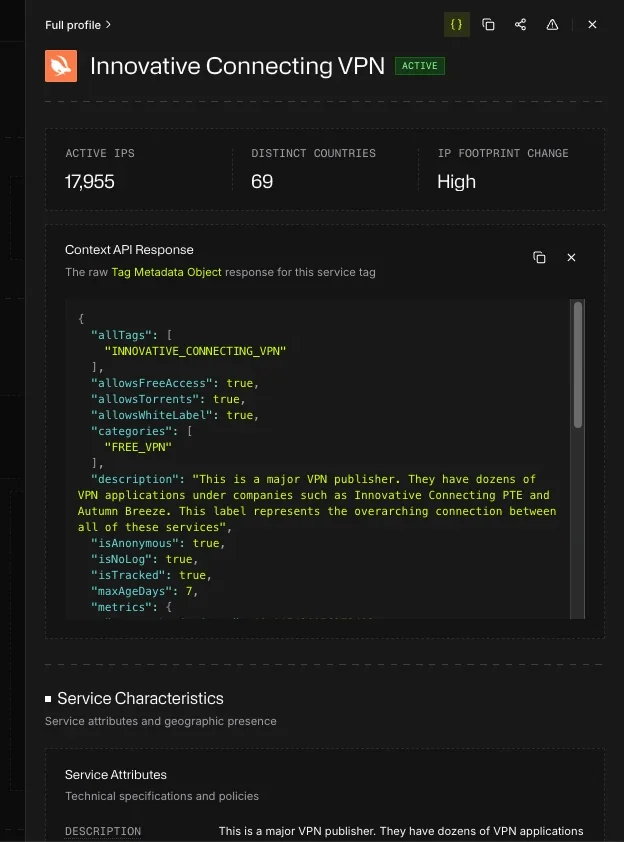
Services, ASNs and IPs linked from these pages open in a sheet from the right, so you keep your place. That includes the services under Top Services by IP Presence, Similar Services, Known Resellers and Resold Services, and the ASN and services shown on an IP. Full profile in the sheet opens the full page, and Cmd-click (Mac), Ctrl-click (Windows), Shift-click or middle-click opens it in a new tab instead. Opening a sheet counts as a search, like visiting the page.
Using these pages in an investigation
- From an IP: open the IP's ASN from the breadcrumb to see whether the network hosts many anonymizing services, or select a service on the IP to open its Service Tag page in a sheet.
- Judging a service: check its Service Types and IP Footprint Change. A large, high-churn residential proxy is harder to block by IP than a small, stable datacenter VPN.
- Judging a network: a hosting ASN with a long list of VPN and proxy services under Service Ecosystem is a stronger anonymization signal than one with none.