
Changelog · — Monocle Assess & Enforce, policy decision logging, and Install with AI.
Service Tag page
A Service Tag Report describes one VPN, proxy or other anonymizing service: what it is, how big its infrastructure is, where it exits, and how quickly its IPs change. Search the Spur app for a service tag, such as NORD_VPN, to open one.

The header shows the service's name, its service type, and whether it's Active or Inactive. Inactive means the service has stopped operating. The header also has Copy, Share and Report buttons, and a JSON toggle that shows the raw Tag Metadata Object under the summary.
For services that let customers reach local networks through their proxies, a warning banner explains that this exposes individuals and enterprise networks to potential breaches.
Summary
| Card | What it shows |
|---|---|
| Active IPs | The number of IPs the service has been observed actively using |
| Distinct Countries | How many countries the service has exit nodes in |
| IP Footprint Change | How volatile the service's infrastructure is: Low, Moderate or High (see below) |
IP Footprint Change is the higher of two ratings:
| Rating | Daily churn | Net IP growth (month on month, up or down) |
|---|---|---|
| Low | Under 0.75% | Under 5% |
| Moderate | 0.75% to under 1.5% | 5% to under 15% |
| High | 1.5% or more | 15% or more |
The card shows both figures underneath, for example Daily churn < 1% · Net IP growth -1.0%/mo. A High rating means the service's IPs change quickly, so a static blocklist of them goes stale fast.
Service Characteristics
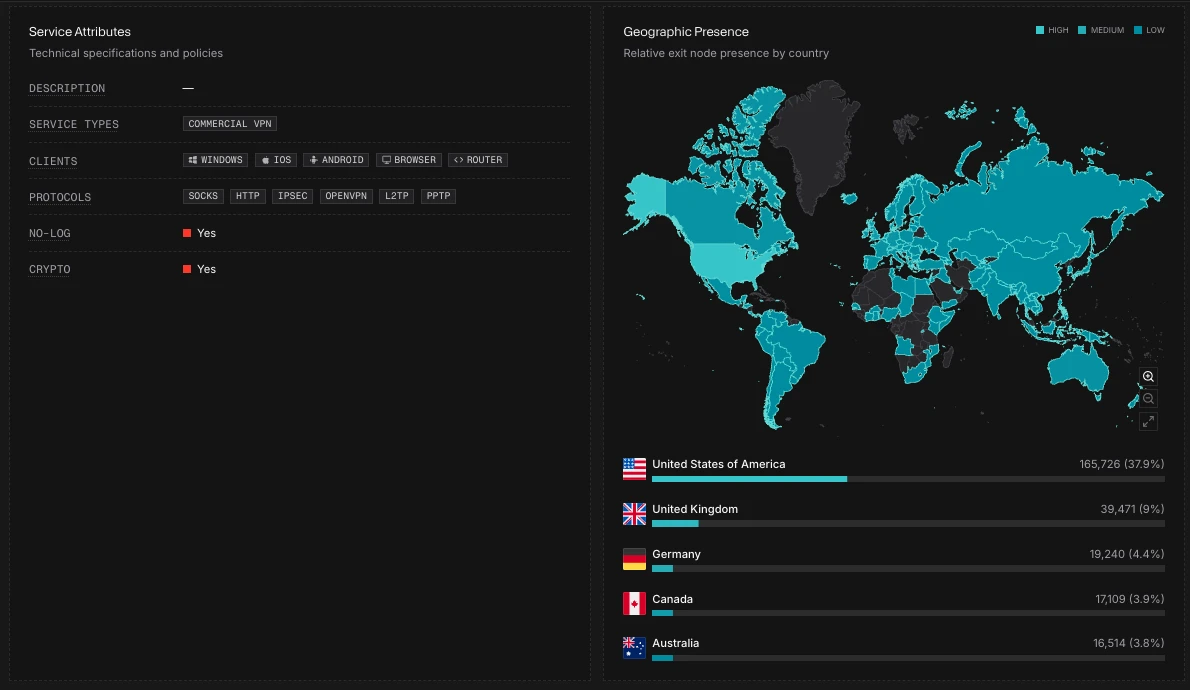
Service Attributes lists the service's technical details and policies:
| Attribute | Meaning |
|---|---|
| Description | A short description of the service |
| Service Types | The categories this service falls into (VPN or proxy type) |
| Clients | The client platforms (operating systems and apps) the service runs on |
| Protocols | The network protocols the service supports, such as OpenVPN, WireGuard or SOCKS |
| No-Log | Whether the service claims to keep no logs of user activity or connection metadata |
| Crypto | Whether the service accepts cryptocurrency as a payment method |
Geographic Presence maps the service's relative exit node presence by country, and lists its top 5 countries with their IP counts and share. Darker shading means more presence. The High, Medium and Low labels are the map's color key, not a rating per country.
IP Activity
How the service's infrastructure changes over time:
| Item | What it shows |
|---|---|
| Active IP Trend | Average active IP addresses by month |
| Net IP Growth | Percentage change in active IPs against the previous month |
| Average Daily Churn | The share of the service's IPs that change each day. Under 1% shows as "< 1%". |
| TTL | The maximum age of an indicator, in days: how long an IP stays attributed to this service after it was last seen |
Related Services
- Similar Services: services with similar characteristics
- Known Resellers: downstream services known to resell this service
Selecting a service opens it in a sheet. See Opening a linked result.
Resellers
Some services resell another provider's network rather than running their own. Searching for one shows Resold Services instead: the upstream services it's associated with.