
Monocle Dashboard
The Monocle dashboard, called Traffic Intelligence in the app, shows how traffic is reaching your application: how much of it is anonymous, where it comes from, when it arrives and which services it uses.
To open it, go to the Monocle dashboard and choose your application.

If Monocle hasn't seen any traffic for your application yet, you'll see Watching for Traffic instead of the dashboard. Once Monocle detects your first traffic, you'll see a Welcome to Monocle! screen. Select View Intelligence to go to the dashboard. See the Quick Start.
Choose what you're looking at
Two controls at the top of the page apply to everything below them.
- Traffic filter: show All Traffic, only Anonymous traffic, or only Non-Anonymous traffic.
- Date range: the dashboard shows the last 30 days by default. You can switch to Last 7 Days, Last 60 Days or Last 90 Days. A custom date range requires the Team plan or above; on other plans, the custom range is shown locked. The calendar goes back 120 days, and a range can be up to 90 days long.
Summary
Three cards summarize the selected range:
| Card | What it shows |
|---|---|
| Total Sessions | All sessions Monocle assessed |
| Anonymous Sessions | Sessions that came through an anonymizing service, such as a VPN or proxy |
| Anonymous Share | Anonymous sessions as a percentage of the total |
Each card also shows how the figure changed compared with the previous period. On Anonymous Share, the change is the difference in percentage points: a share that moves from 40% to 44% shows as +4%.
If a card has nothing to compare against, it says No prior period data. Each card checks this on its own: if the previous period had sessions but none of them were anonymous, Total Sessions shows a change while Anonymous Sessions and Anonymous Share say No prior period data.
Sections
The dashboard has four sections. Each one has an Explore link that opens the matching tab in Explorer for the same date range, where you can filter and investigate further. The traffic filter doesn't carry over, so Explorer starts on all traffic. Explorer requires the Team plan or above; on other plans, it shows a preview with example data. A section can also show up to three insight cards.
Traffic Overview
- Traffic Distribution Over Time: daily volume. Switch the chart between Assessment (anonymous vs not anonymous) and Type of Traffic.
- Traffic Breakdown: your top 5 traffic types by volume and their share of your traffic. Types with no traffic in the range aren't listed. A session can count toward more than one type (for example VPN and DCH), so the shares can add up to more than 100%.
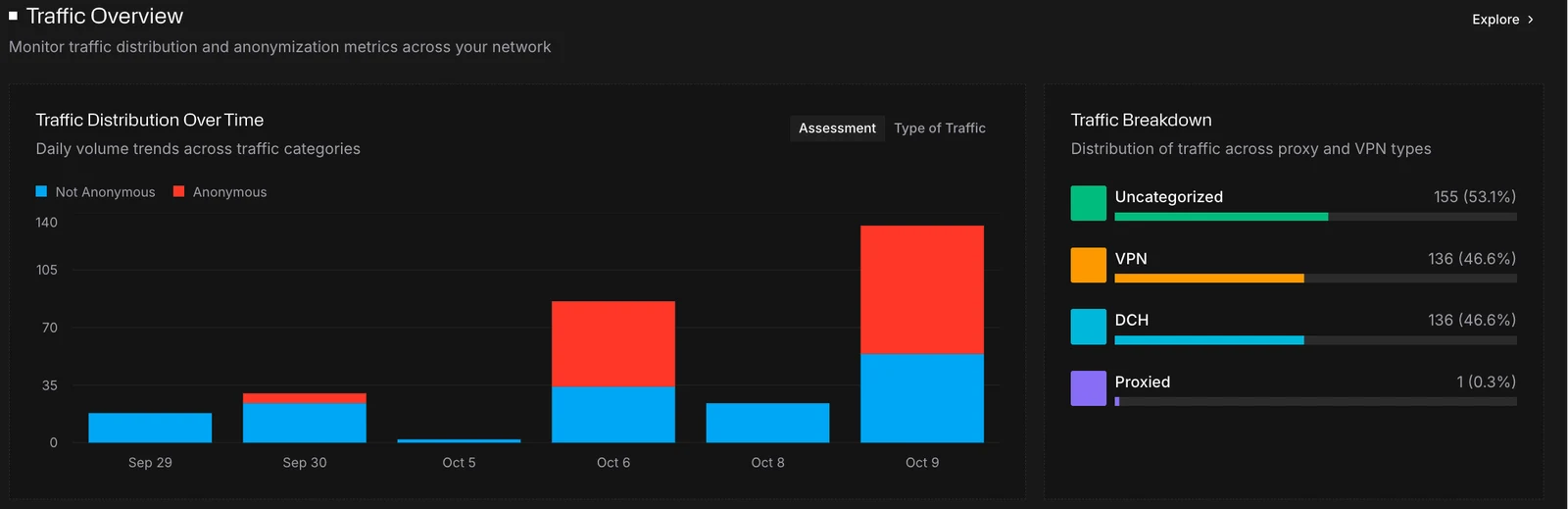
| Traffic type | Meaning |
|---|---|
| VPN | Traffic routed through a VPN provider |
| Proxied | Traffic routed through a proxy service |
| RDP | Traffic from Remote Desktop Protocol sessions |
| DCH | Traffic from datacenter IPs |
| AI Agentic | Traffic from autonomous AI agents |
| AI Crawling | Traffic from AI web crawlers |
| Uncategorized | Sessions that aren't anonymous and don't match any of the types above |
Geo Intelligence
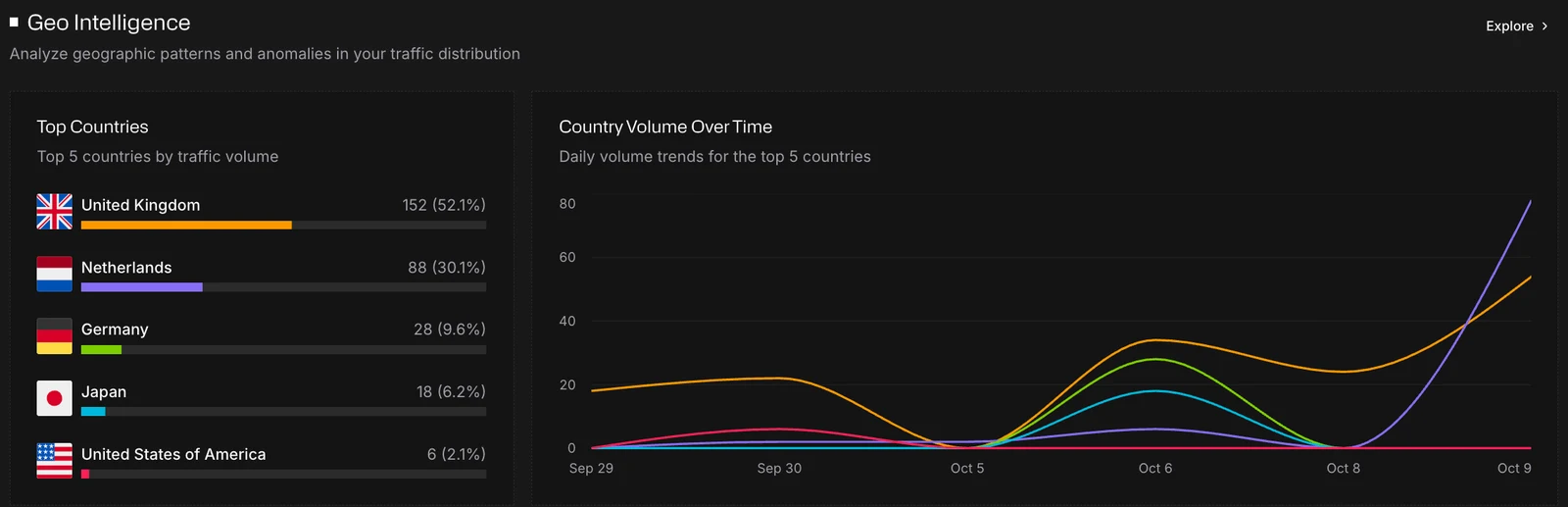
- Top Countries: the top 5 countries by traffic volume
- Country Volume Over Time: daily volume for those 5 countries
Time of Day Behavior
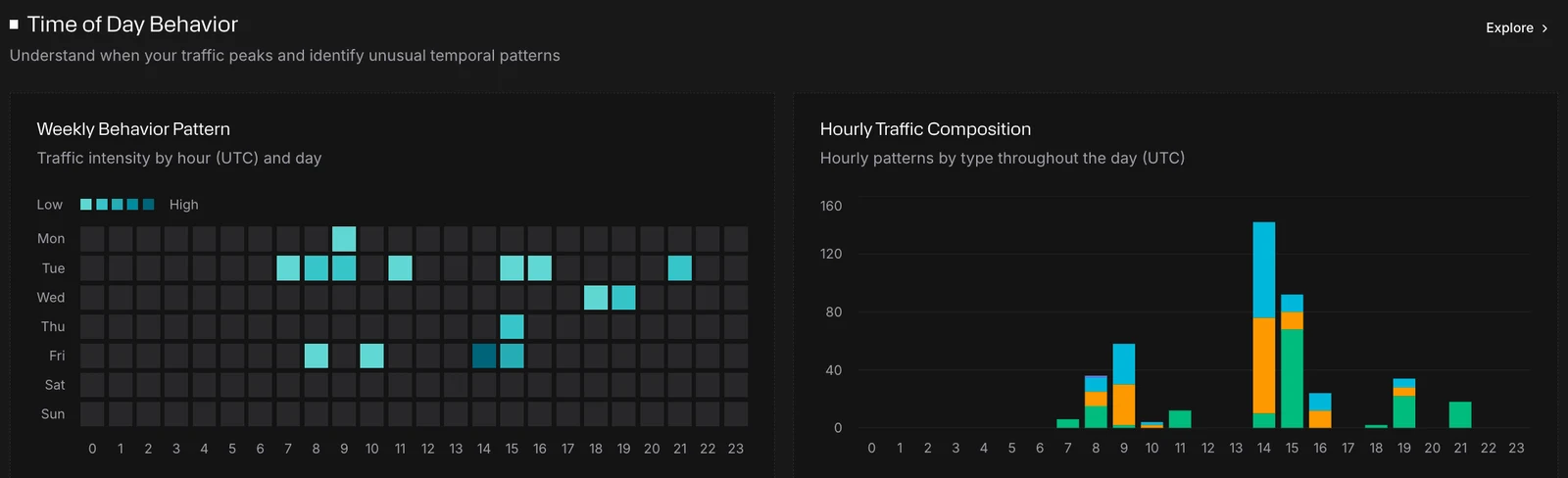
- Weekly Behavior Pattern: traffic intensity by hour and day of the week
- Hourly Traffic Composition: how the mix of traffic types changes through the day
All times are in UTC.
Service & Infrastructure Intelligence
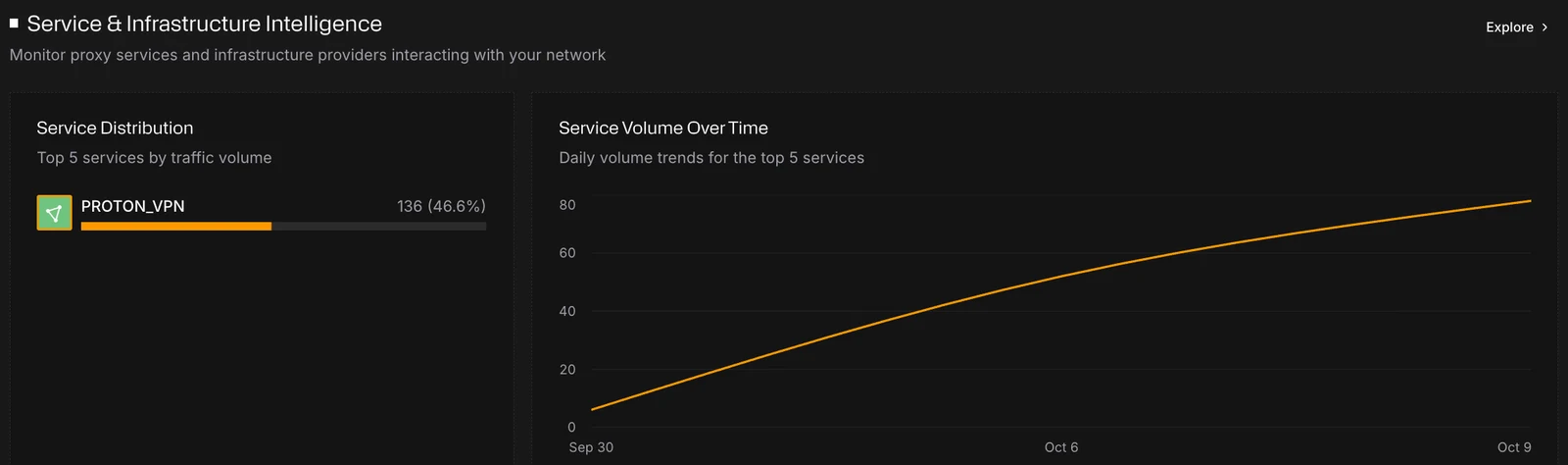
- Service Distribution: the top 5 services by traffic volume. Select a service to look it up in Search.
- Service Volume Over Time: daily volume for those 5 services
Insight cards
Monocle checks each section for patterns worth your attention and shows up to three insight cards, most significant first. A section with nothing notable shows no cards.
Each card has a short title, a sentence explaining what Monocle found, and a badge for the kind of finding:
| Badge | What it means |
|---|---|
| Anomaly | A sudden change: a spike or drop in volume, for a country or a service, or unusually uneven traffic through the day |
| Trend | A sustained change: steady growth or decline overall, for a traffic type, for a country, or a service shrinking |
| Shift | The anonymous share of your traffic has moved |
| Dominance | Concentration: one country, service or traffic type accounts for most traffic, anonymous traffic is the majority, or traffic clusters in a peak hour or in business hours |
| Bias | Traffic skews toward night-time hours (00:00 to 06:00 UTC), overall or for a traffic type |
Using the dashboard
- Check the summary cards for a change in anonymous share against the previous period.
- Read the insight cards to see what changed and where.
- Select Explore on a section to investigate it in Explorer (Team plan or above).
- When you know which traffic you want to stop, set up a policy.